

































Newsletter

Subscribe to never miss an update in mobile app marketing.

Login
Get Started
Book a Demo

Boost your Apple Ads success with automation, optimization

apple ads partner logo

Manage your Apple Ads campaigns with data-driven campaign management, optimization, automation and expertise to increase your app’s performance and ad revenue.

apple ads partner logo

Trusted by 5,000+ mobile app and game companies around the world

google logo spotify logo starbucks logo crypto.com logo square logo grammarly logo calm logo priceline logo paramount logo zalando logo dream logo productmadness logo fox logo wolt logo creditcarma logo

Expand your campaigns’ returns with smart solutions

apple search ads dashboard
searchads.com benchmark visual
apple search ads dashboard

Analyze competition and stay one step ahead

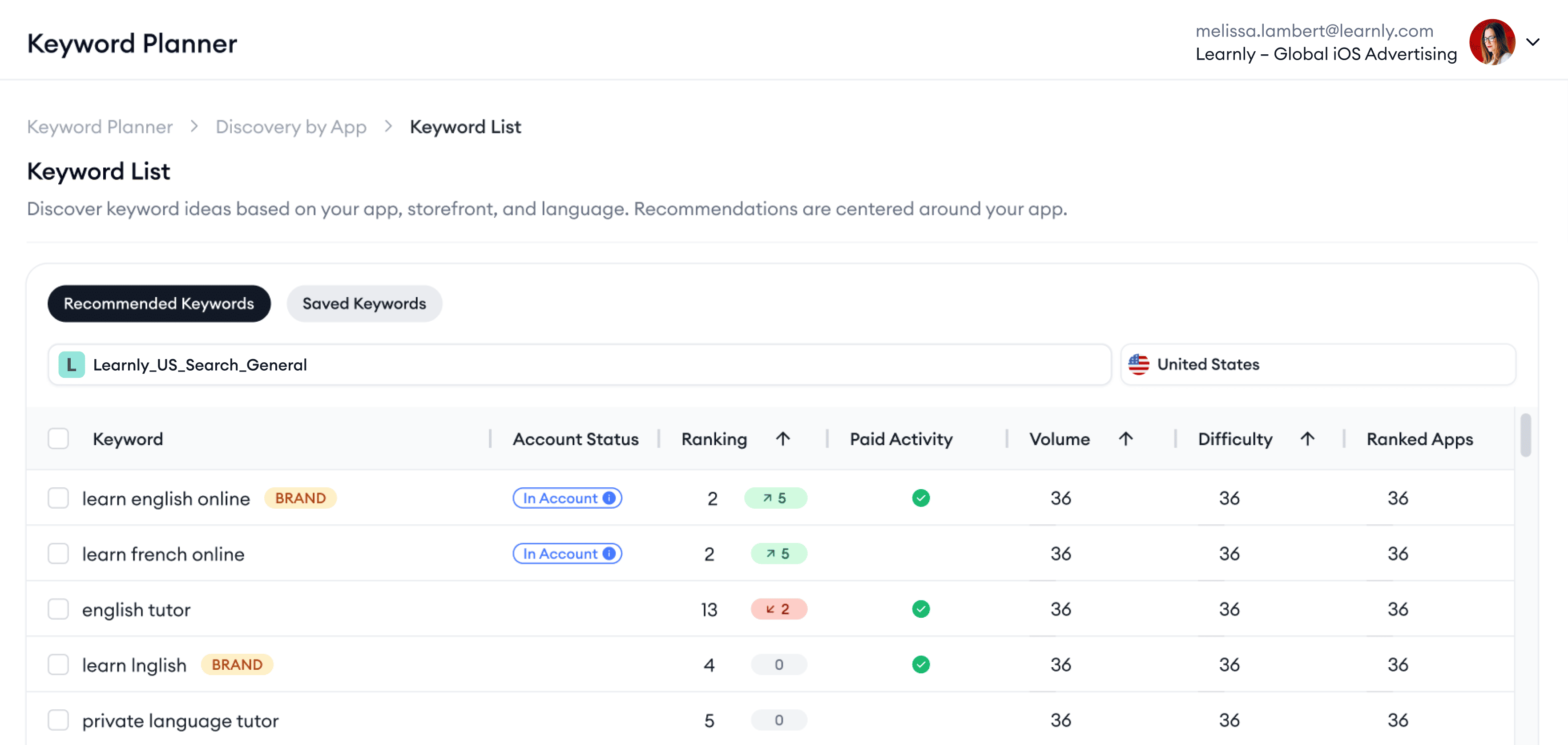
Explore competitors’ keyword strategies and performance metrics for all 4 placements with Apple Ads keyword tools.

Identify high-intent keywords

Utilize data for 4 Apple Ads placements to maximize visibility and impact.

Access new audiences

Bid on organic keywords your competitors are ranking and reach untapped audiences.

Pinpoint competitor strategies

Analyze competitors' keyword usage, impression shares, and ad placement tactics.

Let your category’s data trends guide your next move

Shape your Apple Ads strategy with detailed analysis of market conditions.

Compete smarter

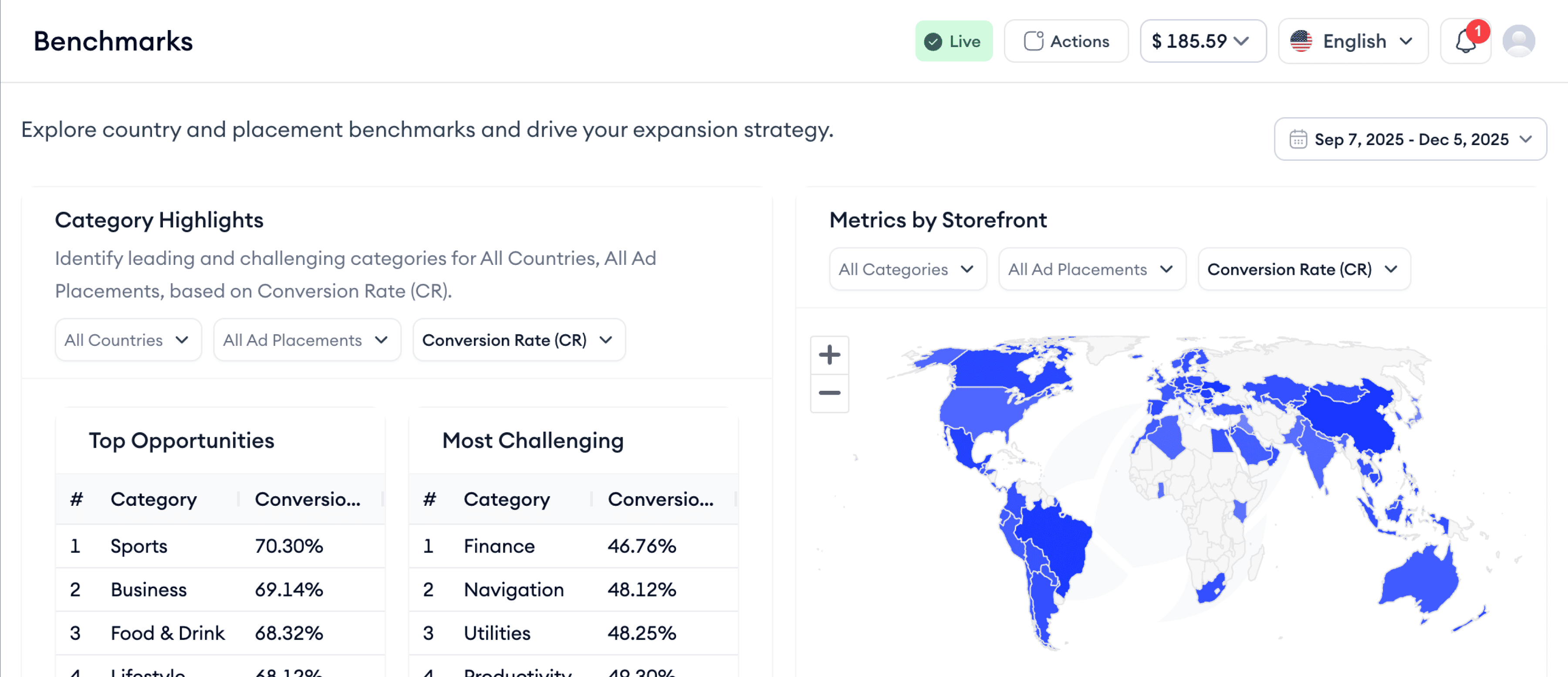
Outperform the market by benchmarking like a pro.

Evaluate key metrics

Spot the gaps. Analyze your KPIs against industry averages to identify improvement areas.

Leverage tailored suggestions for keywords, bids, and budgets

Unlock the full potential of your app marketing with personalized recommendations.

Analyze performance deeper

Audit your app’s performance from clicks to conversions and spot what’s holding you back.

Fine-tune bids and budget

Receive data-driven bid and budget recommendations to drive stronger.

Act on keyword recommendations

Get keyword suggestions that match your goals.

aso intelligence dashboard
apple search ads dashboard

Take control of your Apple Ads campaigns

Apple Ads management tools you need to launch and oversee high-performing campaigns.

Create multi-placement campaigns at once

Build campaigns, ad groups, ads, keywords and more without leaving the platform.

Manage with control and visibility

Act fast on one dashboard and optimize bids, budgets, and keywords instantly.

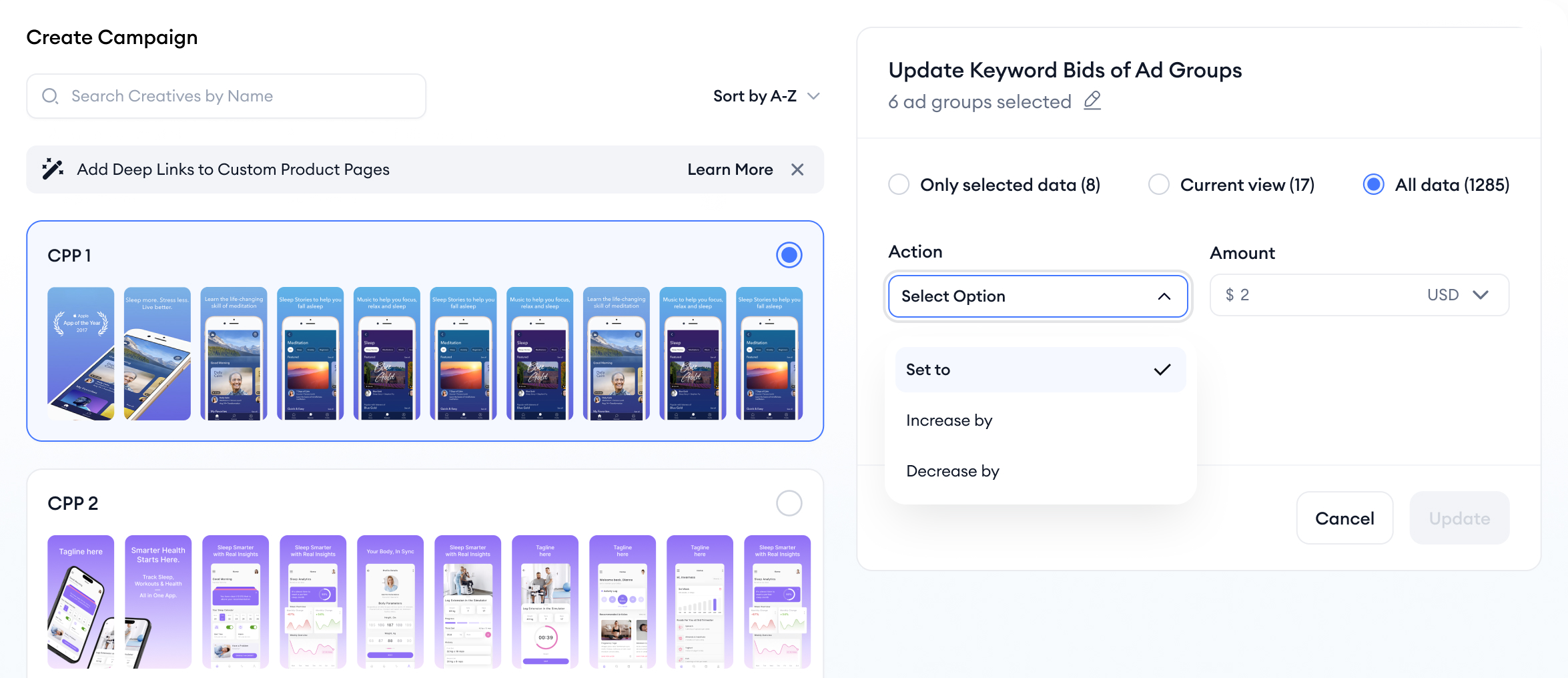
Perform bulk actions

Speed up your workflow with powerful bulk actions for bids, budgets, and keywords.

Craft campaigns that work with guidance on every step

Apple Ads campaign creation is simple as can be with Campaign Wizard.

Setup campaigns quickly with a smart tool

Build Apple Ads campaigns in 3 simple steps.

Get competitor-based keyword suggestions

Fuel your strategy with keywords already working in your category.

Pair with smart tools for better results

Maximize results with smart optimization tool combinations.

apple search ads dashboard
smart bidding visual

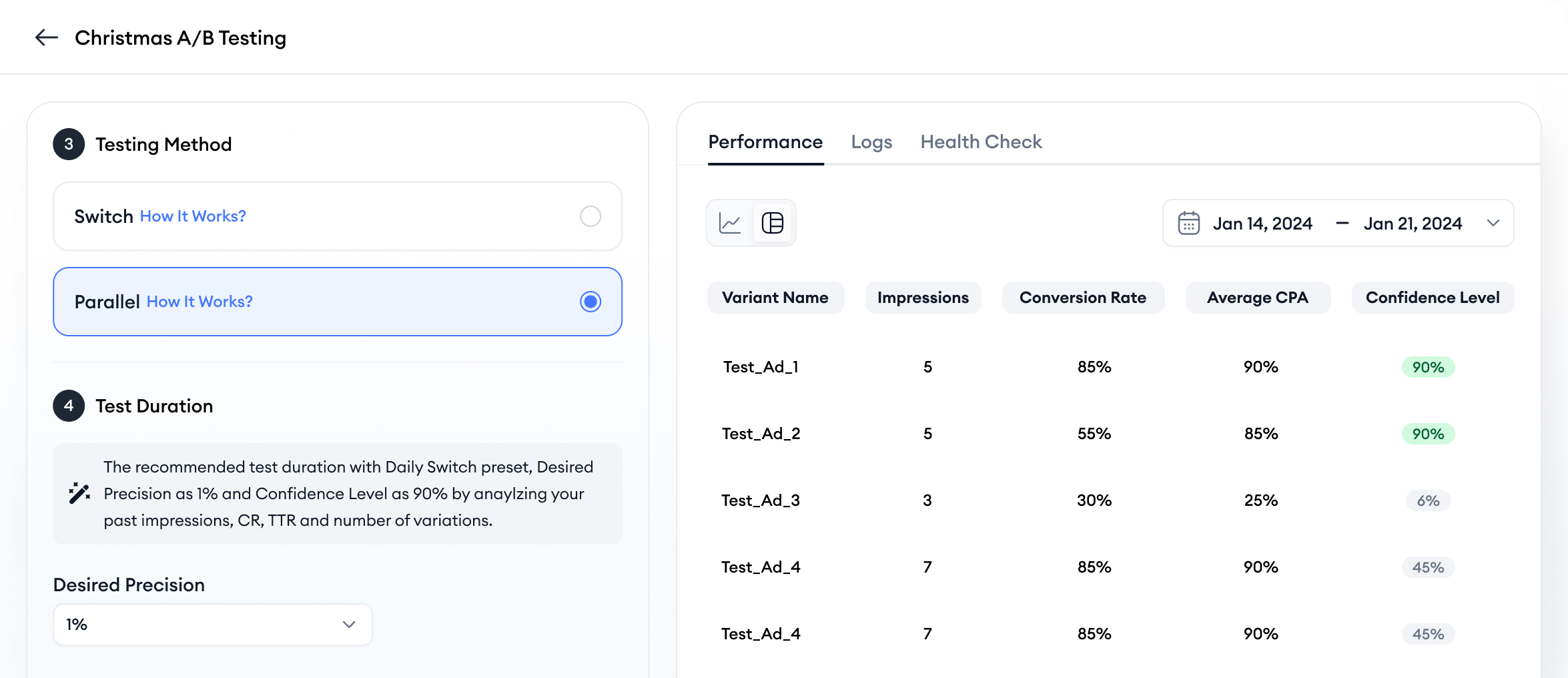
Simplify and automate your custom product page A/B tests

Replace exhausting manual processes with automated, statistically reliable A/B tests.

Test different elements

Test ad group performance, compare custom product pages or build default vs. custom product page tests.

Test towards your preferred method

Pick between alternating or running ad groups simultaneously, based on your strategy.

Monitor your tests' health and results

Utilize confidence levels, visual results, test health and performance.

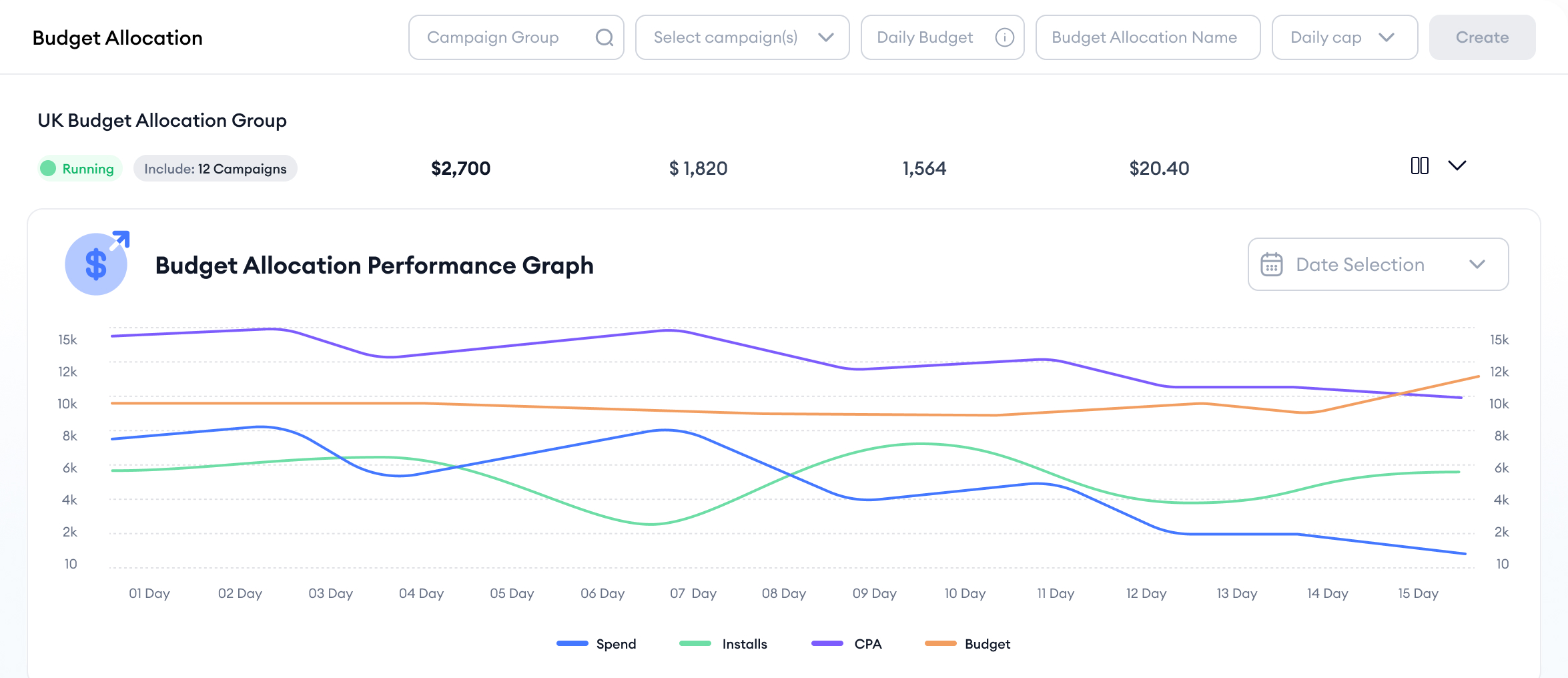
Spend smarter and maximize impact with budget allocation

Use smart budget allocation to get the most out of every dollar and boost campaign performance.

Optimize budget without manual work

Automatically allocate spend to campaigns it matters most and schedule budget changes according to traffic patterns.

Say goodbye to over and underspending

Maintain the perfect balance. Stop wasting budget or missing opportunities.

Skip manual country research

Avoid the manual work. Let Budget Allocation identify where to invest, automatically.

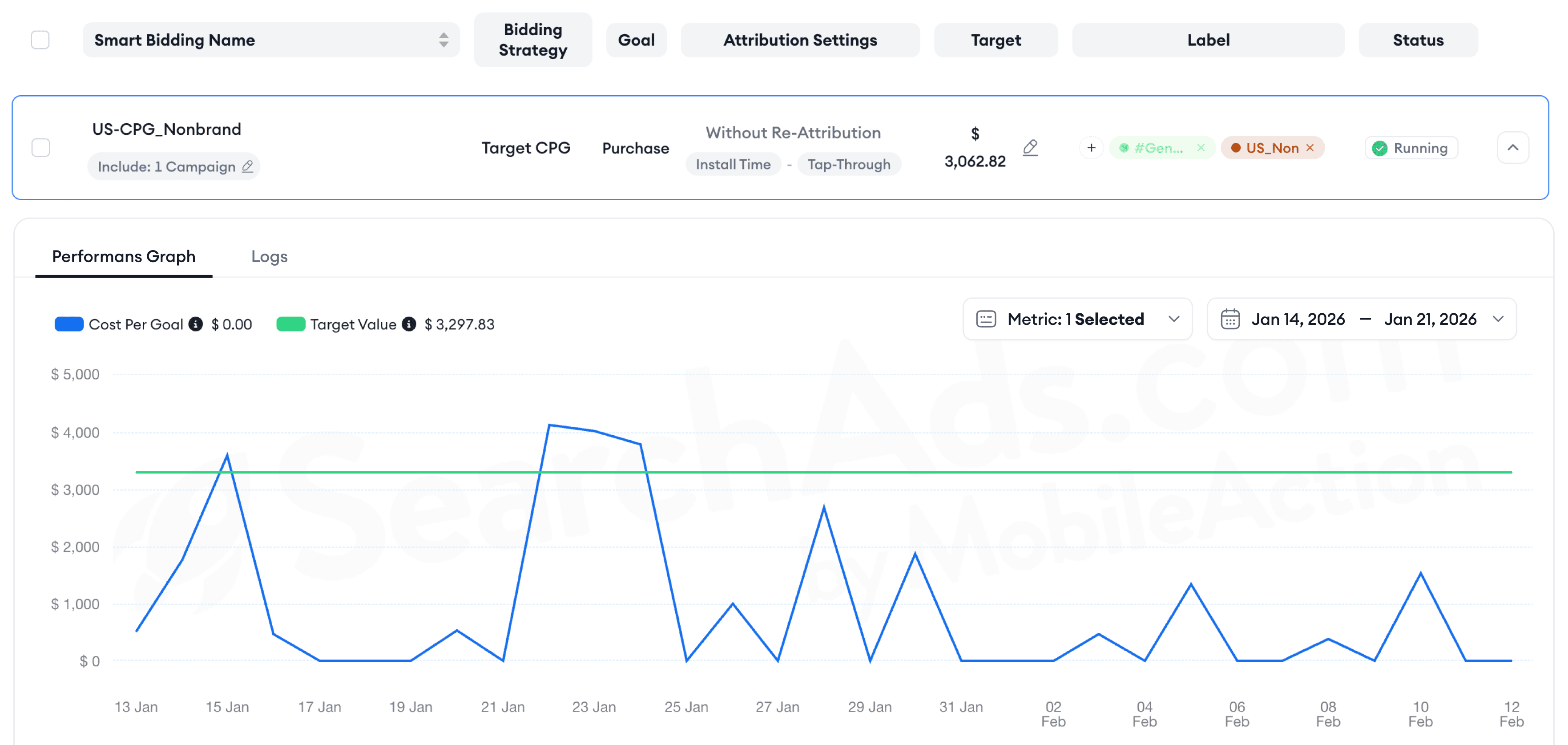
Smart bidding that works so you don’t

Optimize Apple Ads bids in real time to boost performance, hit your goals, and stay ahead of the competition.

Focus on your key metric

Optimize for your chosen KPI—whether it's CPI, ROAS, CPA, or any metric that defines success for you.

Optimize campaign portfolios

Manage bids across sets of campaigns or ad groups in single optimization groups.

Scale smart across storefronts

Optimize bids of campaigns or ad groups across multiple storefronts in single optimization groups.

apple search ads dashboard
aso intelligence dashboard
apple search ads dashboard

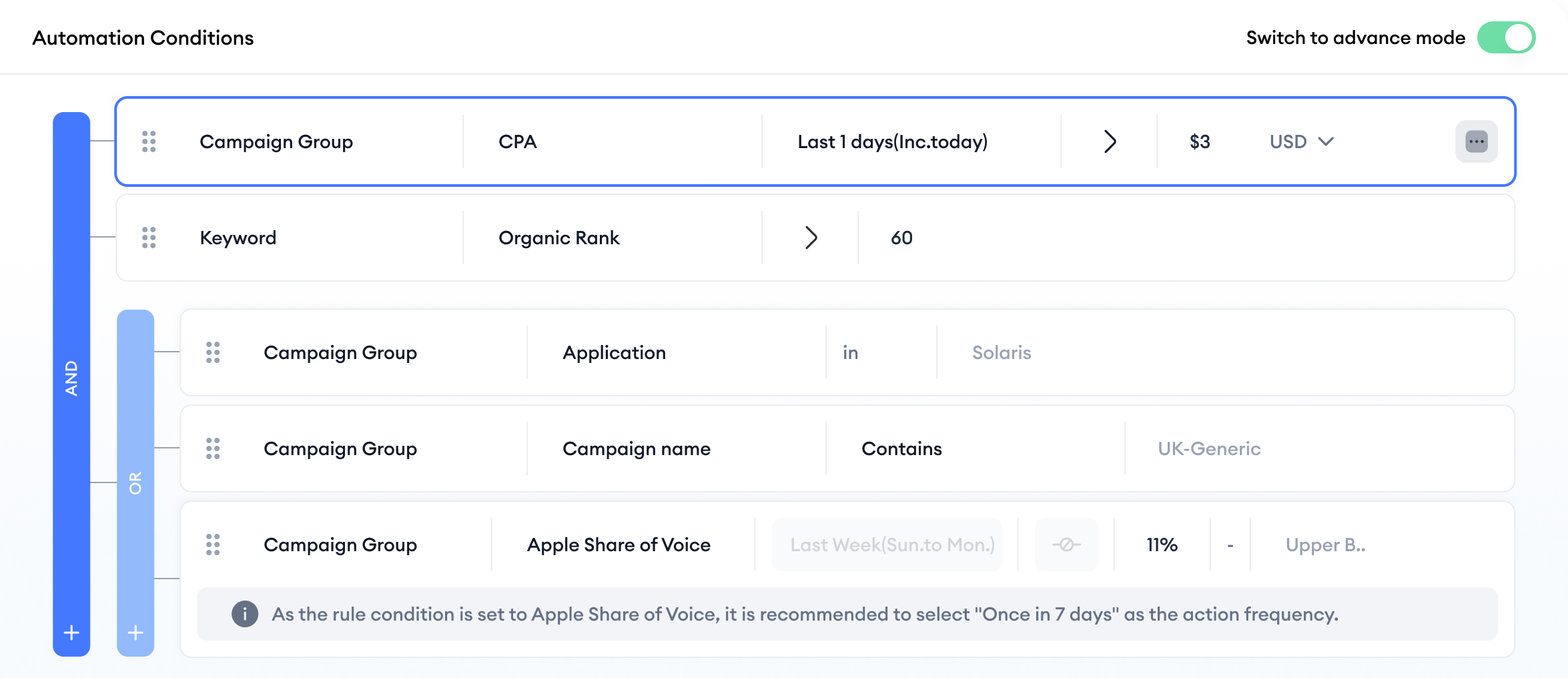
Simplify campaign optimization, maximize impact

Amplify your app’s presence, smartly manage budgets, and secure your brand with condition-based Apple Ads automation.

Make multi-layered automations

Set advanced rules using conditions from various campaign levels to boost performance.

Bridge organic and paid performance

Use automations to optimize paid campaigns based on organic performance.

Leave manual errors behind

Eliminate guesswork and human error with fully automated, data-driven processes.

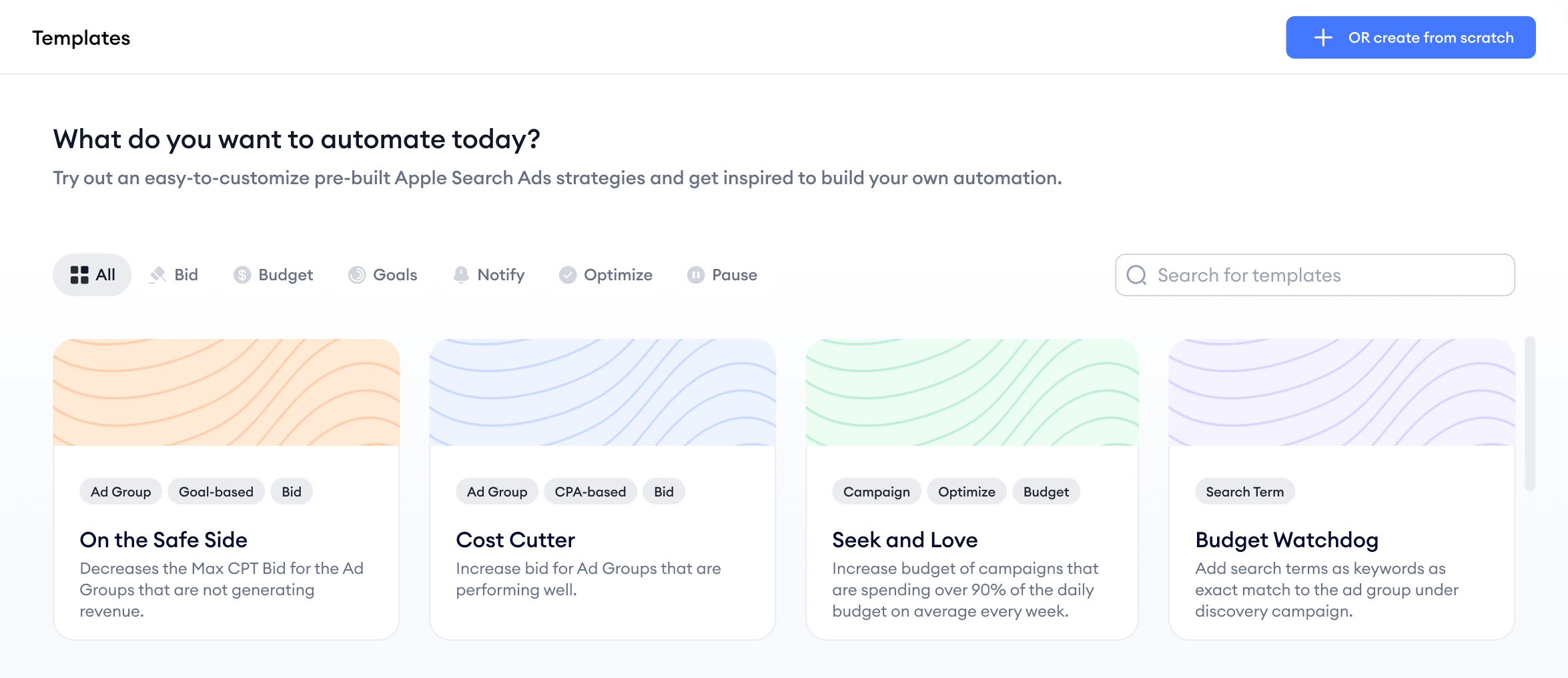
Leverage ready-made automation templates designed for specific goals

Use over 20+ advanced, templates to automate and enhance every aspect of your Apple Ads campaigns.

Act fast with quick templates

Use templates to take immediate action based on performance signals—no setup delays, just results.

Customize according to your needs

Edit templates for the exact campaign changes and goals you care about and always be in control.

Use templates for smart alerts

Set rules to get alerts on high-cost or low-performing keywords and take action instantly.

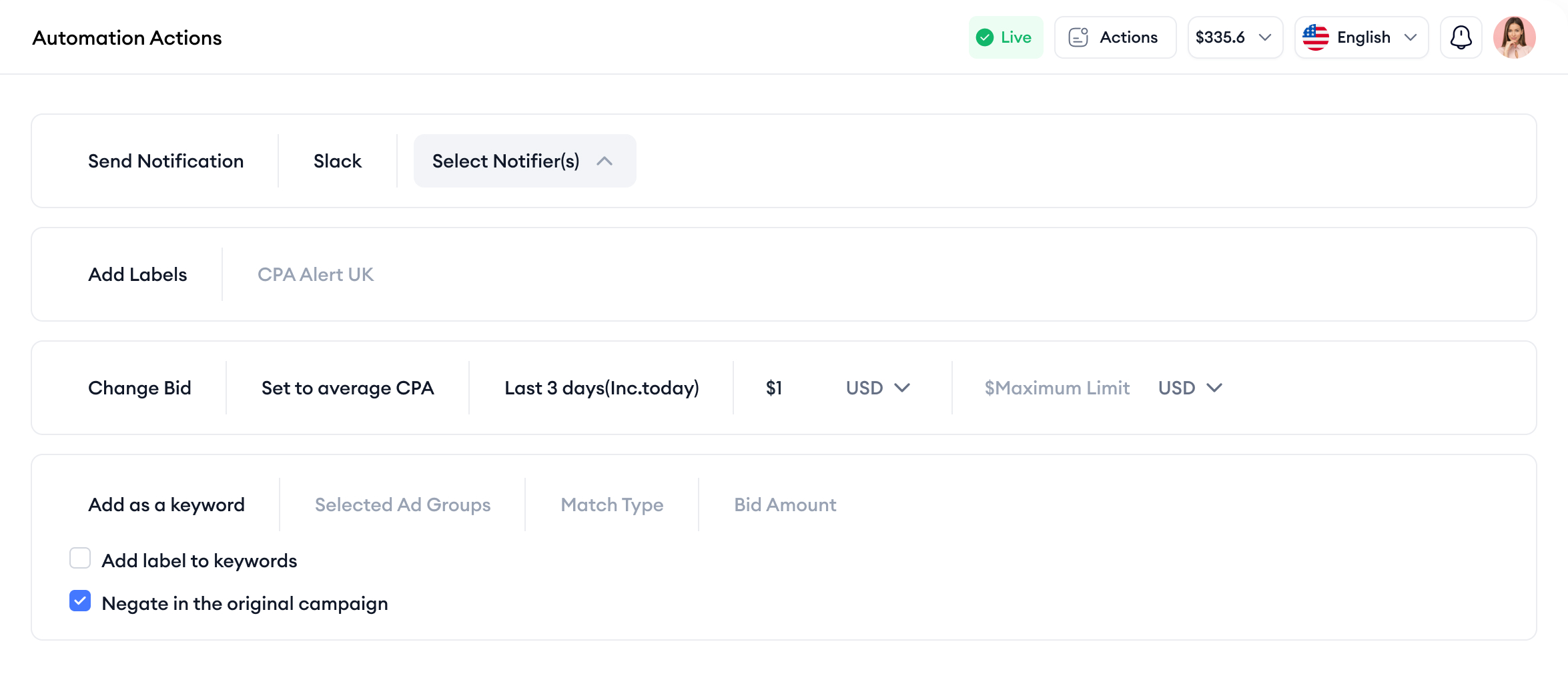
Stay informed of your performance with automated notifications

Stay on top of campaign performance by setting up templates or custom automations that notify you of key campaign movements.

Get Slack notifications

Gain visibility into campaign updates delivered directly to your Slack workspace.

Receive notifications via email

Keep an eye on important campaign alerts and updates right in your inbox.

apple search ads dashboard
mmp discrepancy dashboard

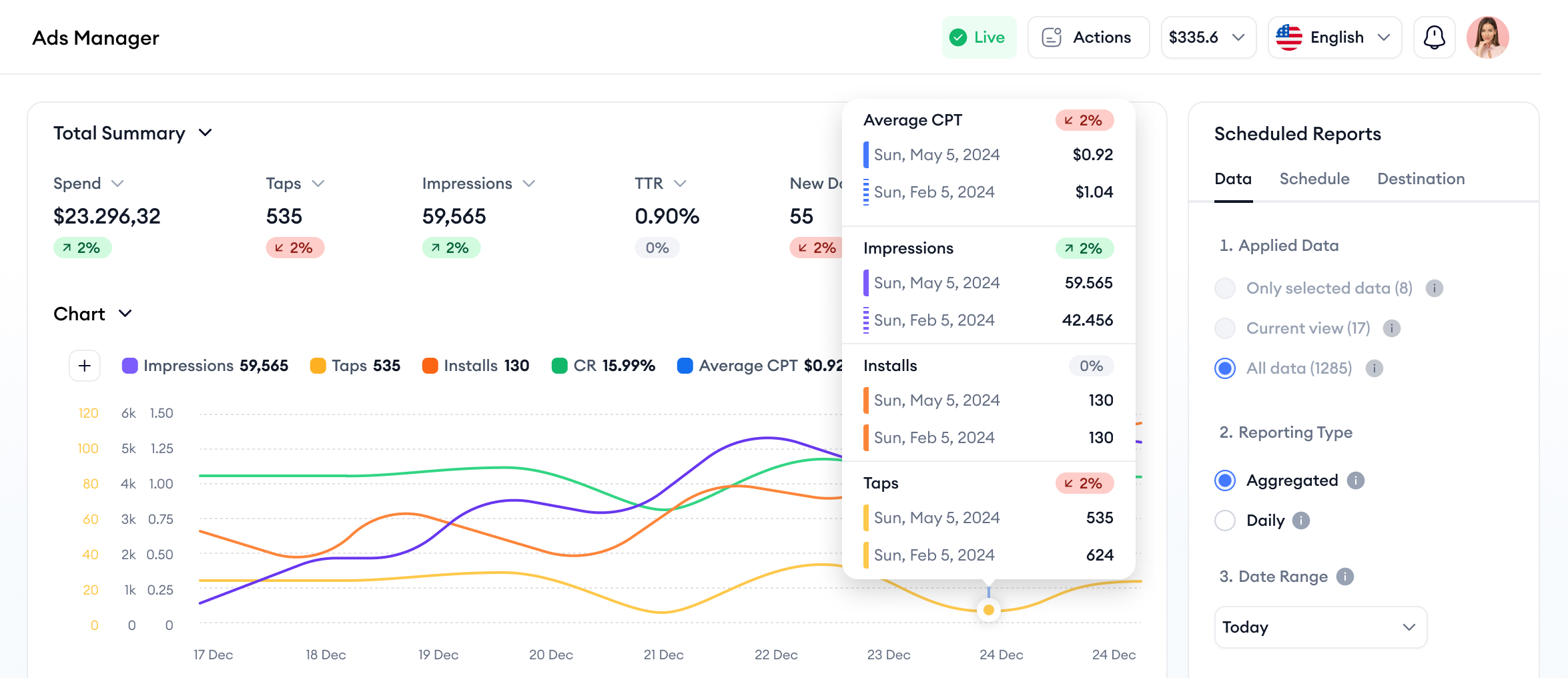
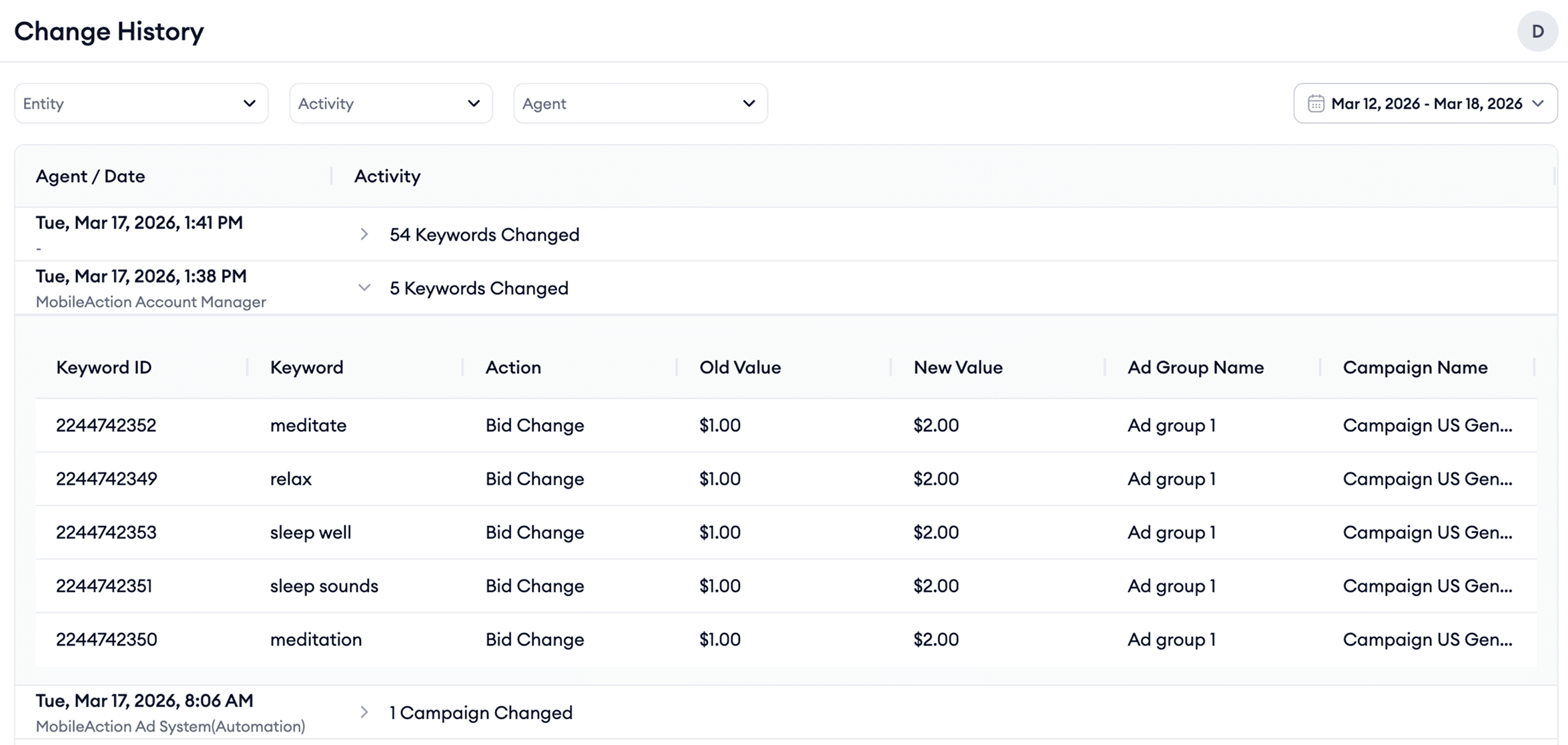
Keep a close eye on your campaigns, track every change

Easily track changes as they happen and spot trends early with detailed reporting and filters with MobileAction's Apple Ads campaign manager.

Filter, compare, and analyze with ease

Isolate the metrics you care about, track changes by the hour, compare time frames and filter towards metric trends to identify growth or gaps.

Automate reporting and stay consistent

Schedule recurring reports to be delivered directly to your inbox and stay in the loop without manual effort.

Customize your view with pivot tables

Analyze campaign performance your way. Break down metrics by any dimension and build insights that match your strategy.

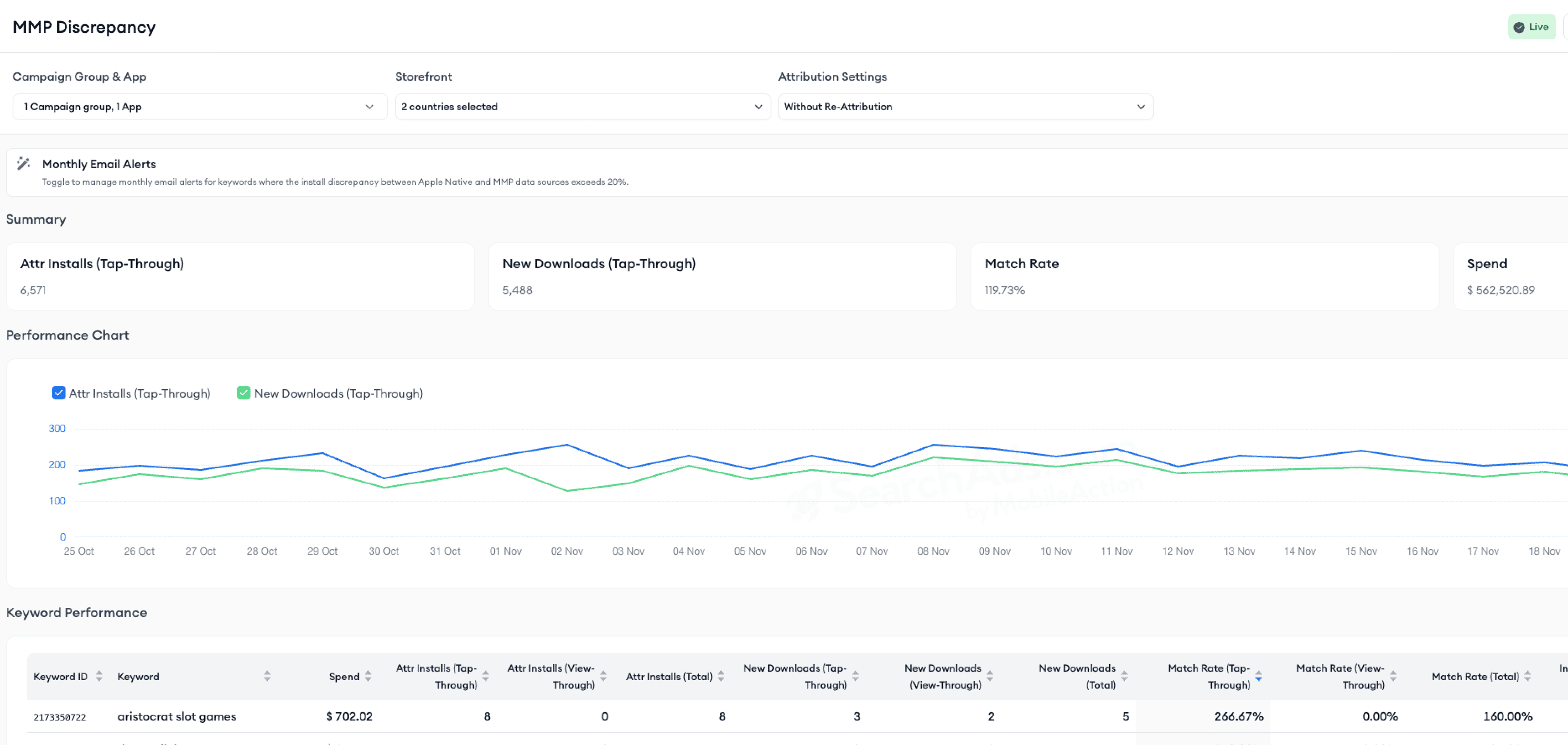
Understand where your install data stops matching

See exactly where, when, and why your Apple Ads data and MMP data diverge.

Compare Apple Ads and MMP installs

Break down discrepancies to quickly understand where numbers stop aligning.

Identify the root cause of mismatches

Spot issues caused by attribution settings, conversion windows, delays, or missing signals.

Get discrepancy alerts

Get notified when install discrepancies exceed your defined thresholds.

Integrations for exceptional results

blue icon blue icon
Spend
Impression Share
Impressions & Taps
Downloads
Keyword Popularity
Apple Ads Data
integration orange icon orange icon
adjust logo
In-App Events
appsflyer logo
Revenue
singular logo
Installs
branch
airbridge-favicon
Reattribution
kochava logo
MMP DATA
mobileaction icon

Change how you acquire users for your app with SearchAds.com

Before
Combine post-install metrics with Apple Ads for a full user acquisition picture
After
Before
No post-install metrics analysis
After
Before
Access your competitors paid and organic keywords with a single click
After
Before
See solely your performance
After
Before
Take actions on keywords in bulk
After
Before
Only one keyword action at a time
After
Before
Integrate your measurement and attribution solution for a full funnel view
After
Before
No measurement and attribution solution integration
After
Before
Create custom columns, presets, and saved filters
After
Before
Manual campaign management and increased labor
After
Before
Combine your ASO with Apple Ads to take advantage of organic paid synergy
After
Before
No UX customization
After
Before
Adjust your bids automatically with Smart Bidding and custom automations
After
Before
Inability to leverage organic and paid campaigns together
After
work with experts

Work with experts who know app growth inside out

10+ years of expertise

Partner with a team that brings expertise in Apple Ads, ASO, and app growth strategy, providing not just support but strategic guidance.

Personalized, customer-centric guidance

Experience tailored support from 55+ app growth consultants, offering proactive solutions and strategic collaboration for long-term success.

Global support

Get expert help in 10+ languages across regions, always feel understood and supported wherever your app grows.

Security matters to us

Industry leaders trust MobileAction to optimize their mobile app strategies and stay ahead in the competitive digital landscape.

Explore Security
SOC2 Certified
SOC2 Certified
GDPR Compliant
GDPR Compliant
Apple Ads Partner
Apple Ads Partner
81-99%

increase in SoV brand terms

50%

ROAS uplift

40%

decrease in CPC

Using Budget Allocation and Automations helped Square reach a 50% ROAS uplift + 40% CPC decrease
83%

spike in First-time Deposits

30%

surge in impressions

49%

decrease in CPA

Entain Cuts CPA by 49% in 3 Months with Smart Bidding & ASO
55.5%

lower overall cost per goal (CPG)

2x

ad spend

5x

in-app purchases

Hallow hits 55% lower cost per goal while increasing purchases by 5x
800%

increase in monthly Apple Ads spend

How Codeway Scaled Up Their Monthly Apple Ads Spend by 800%
58%

uplift in installs

168%

scale in Apple Ads spending

How Apple Ads spend of Rappi scales by 168% with SearchAds.com
2x

more installs

150%

increase in ad spend

How Kwalee Scaled Up Their Apple Ads By 150%

Frequently asked questions

What is MobileAction’s Apple Ads solution?
MobileAction is a platform built to support teams running Apple Ads, especially when campaign management needs to scale beyond day-to-day manual work. It helps app growth teams bring their Apple Ads workflow into a structured platform so you can create and manage campaigns, review performance, keep track of what’s changing in the account, and take action with fewer back-and-forth steps. Many teams use MobileAction’s Apple Ads solution alongside ASO Intelligence because Apple Ads and store performance are closely connected. MobileAction helps you manage Apple Ads with that bigger picture in mind, so it’s easier to align what you’re bidding on and what you’re learning from paid search with what you’re doing on the store side. If you’re not sure whether it’s the right fit for your needs, book a demo with our experts and we’ll walk you through.
Who is MobileAction’s Apple Ads solution for?
MobileAction’s Apple Ads solution is for teams running Apple Ads who want a clearer way to manage performance at scale. It’s commonly used by UA managers, app growth marketers, and agencies that work across multiple campaigns, markets, or apps and need reliable ways to monitor results and take action faster.
Do I need an Apple Ads integration to use SearchAds.com?
Yes. To see Apple Ads data and use Apple Ads-related workflows in SearchAds.com, you’ll connect your Apple Ads account. This lets the platform pull in the performance data needed for reporting and optimization.
What is Smart Bidding and what is it used for?
Smart Bidding is designed for teams that want to optimize toward a clear goal (for example, an acquisition cost target) without manually updating bids all day. Instead of relying on one-off bid changes, teams use Smart Bidding to guide bidding behavior based on the strategy they choose and the target they set.
What are Automations, and how do teams use them?
Automations help you apply repeatable actions based on rules, so routine work doesn’t depend on daily manual checks. In MobileAction, you can build Automations using multiple layers of your Apple Ads account structure. That means you can combine campaign and ad group selections with keyword-level targeting in the same setup, so the rule applies only to the exact segment you want. Teams use this to keep workflows consistent at scale, like maintaining Share of Voice for priority keyword groups, supporting pacing goals, or applying performance-based actions across selected campaigns and ad groups without treating the whole account the same way.
How do I know which custom product page works best?
The most reliable way is to run an A/B test. The CPP A/B Test tool lets you compare two or more page variants so you can understand which one drives better results for your goal. Teams often test different messaging angles, screenshots, or value propositions for different audiences, then use the results to decide which page to keep, iterate on, or expand into new variants.
How do I find the right keywords to target in Apple Ads?
MobileAction offers keyword research tools to support targeted paid keyword usage for Apple Ads. You can use it to build and refine keyword lists with a clearer focus on what you want to test in paid search, then turn those findings into a structured keyword plan you can apply to your campaigns.
Is the Apple Ads solution available on a Free plan? What’s included?
Yes. SearchAds.com offers a Free plan for Apple Ads, and Apple Ads support is also available through the Enterprise plan. On the Free plan, you can use Ads Manager to connect your Apple Ads account and manage core workflows, and you also have access to Automations and 20+ automation templates so you can start setting up rule-based actions right away. It’s a practical way to get familiar with the platform and see how it fits your day-to-day Apple Ads workflow before exploring an enterprise-level setup.
Can I see benchmarks to understand if my keyword performance is on track?
Yes. MobileAction provides benchmarking views that help you compare your keyword performance against relevant reference points, so you can quickly understand whether key metrics are trending within a healthy range and spot areas that may need attention.
How do I know whether the Free plan is enough for my team?
If you’re getting started, the Free plan is the right place to begin. It gives you a practical way to understand how MobileAction fits into your Apple Ads workflow. If you find that you need more scale, more advanced setups, or more structured support, that’s when Enterprise becomes relevant. Connect your Apple Ads account to see if the setup you’re exploring fits your current workflow and goals. If you want to learn more about Enterprise, book a demo.